NixTier· The educationally valuable app

The educationally valuable app 😉 · For kids 3 and up · Android

A pet that is happy when your child moves.

Your child feeds, strokes and bathes their pet, plays ball and hide and seek with it – and takes it for walks. Calm, without pressure, without ads. The pet never gets ill, never goes hungry and never dies.

Get it free How it works
QR code for this download pageScan with your phone

Free · Android 8 or newer · version 0.2.2

Our promise to parents

  • No tracking

    No analytics, no device ID, no trackers. What your child plays stays on the device.

  • No ads

    No adverts, no in-game currency, no random rewards, no subscriptions.

  • No account for your child

    No e-mail address, no sign-in, no friends list. Install and start playing.

  • Basic game free

    Dog and cat, all the care, all games and the walks cost nothing – for good.

Features

What your child experiences with their pet

Big symbols, short sentences, a picture for every action. The pet reacts to everything your child does – with a wagging tail, little hearts and happy hops.

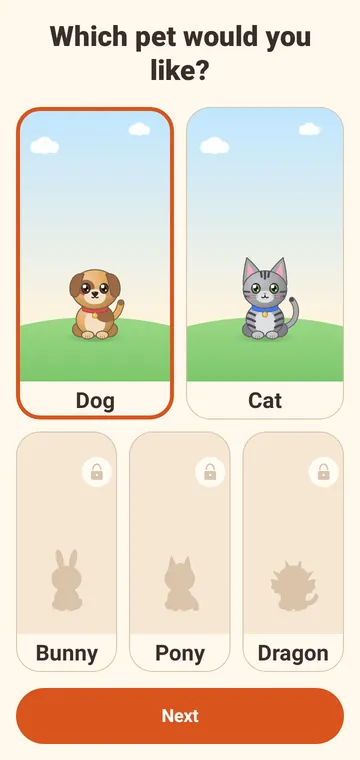
App screen “Which pet would you like?” with a dog and a cat to choose from
App screen “What does your pet look like?” with fur colours and patterns

A pet just the way they want

Dog or cat, 12 fur colours – real ones and fantasy colours like pink, lilac or mint –, patterns, a collar and a name. Twelve name suggestions can simply be tapped, because children don’t like typing.

“What does your pet look like?”

Feeding: the dog waits at its bowl, three kinds of food to tap below
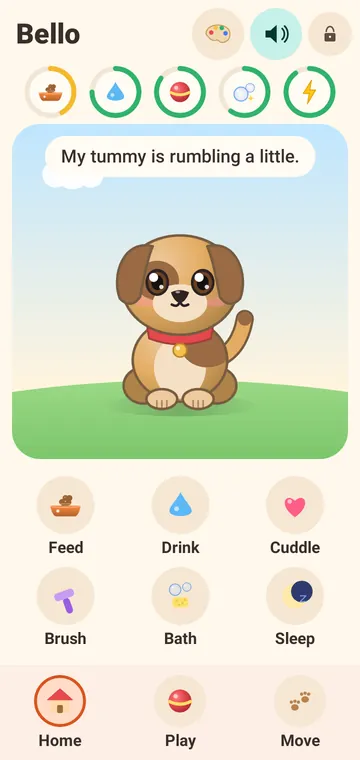
Home screen: the dog Bello in the meadow, above it five symbols for food, water, fun, clean and sleep

Care without numbers and without red

Feeding, drinking, stroking, brushing, bathing and sleeping – with a finger, just like the real thing. Needs drop slowly over hours and never below a friendly minimum. After a break there are no reproaches, just a big happy reunion.

“My tummy is rumbling a little.”

Ball game: the dog brings the ball back
Hide and seek: a bush, a box and a cushion in the meadow

Playing – the pet plays along

Throw a ball and have it brought back, take turns at hide and seek and practise tricks: sit, paw, roll over. A miss is just practice – it works more often with every try.

“Almost! Practice helps.”

Moving & step counter

Out and about together – but never too much

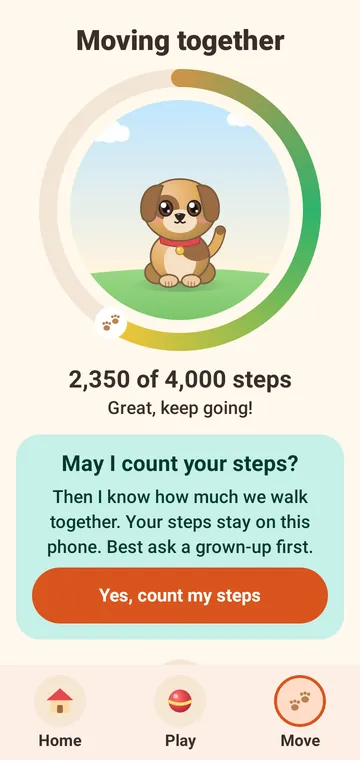
The pet is happy about every walk. The phone counts the steps itself; NixTier shows them as a ring around the pet.

  • Steps are counted only while NixTier is open. No GPS, no location, no movement profiles.
  • Daily goal 4,000 steps, adjustable in the parent area from 1,000 to 10,000 (recommended for 6- to 10-year-olds: 3,000 to 6,000).
  • Going beyond the goal brings nothing extra: the pet is then happily tired. No incentive to overdo it.
  • Without a step counter or permission there is the hopping game: the pet hops first, your child hops along – or taps the big button.
  • Before counting for the first time, the pet asks for permission in child-friendly words – and suggests asking mum or dad first.

“Goal reached! Enough for today – time to rest.”

Moving: a ring showing 2,350 of 4,000 steps around the dog
Goal reached: 4,210 of 4,000 steps, the pet is happily tired
Hopping game with a big “Hop!” button

For parents

The parent area: you set the rules

Behind a gate that children don’t open by accident: hold the lock for two seconds, then solve a maths question for adults.

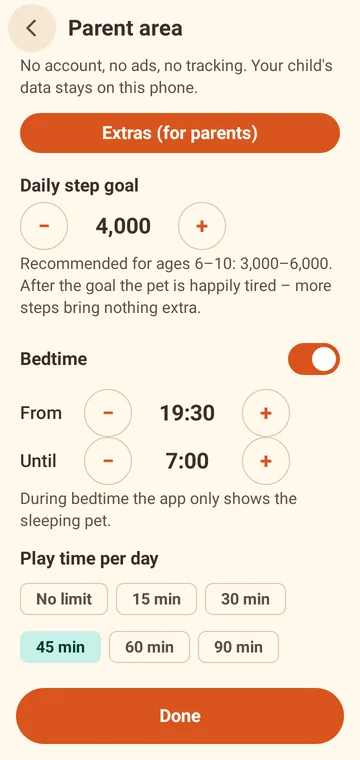
  • Bedtime

    From–to in quarter hours. During this time NixTier shows only the sleeping pet, and sounds are off.

  • Play time per day

    Off or 15 to 90 minutes. After that the pet has a rest – tomorrow you carry on.

  • Step goal

    From 1,000 to 10,000 steps a day, to suit your child’s age and routine.

  • Gate

    Hold for 2 seconds plus a maths question. Three mistakes, then a 30-second pause. Extras, updates and the website link are only here.

Parent area with daily step goal, bedtime and play time per day
Parent gate with a maths question for adults and a number pad
Bedtime: the dog sleeps in its basket under the night sky
Play time over: the pet rests, tomorrow you play again

“Shh … Bello is asleep.”

Safety

What NixTier deliberately doesn’t do

We built NixTier the way we want it for our own children.

  • No guilt

    No notifications, no streaks, no countdowns, no “your pet misses you”. The pet never gets ill and is never sad – at most it would like something.

  • No data about your child

    Pet, name, care, steps and settings stay on the device. No account, no cloud backup, no analytics, no crash reports.

  • Internet for two things only

    Checking for updates and verifying an unlock code. Only the code is sent – no device ID, no cookies.

  • No strangers

    No chats, no friends feature, no free text input except the pet’s name. Links to the outside only in the parent area.

  • No purchase traps

    No prices and no buy buttons in the children’s part. Purchases happen only on this website, only by adults.

  • Quiet when it should be

    All sounds are self-made and moderately loud. A clearly visible sound switch, silent when the phone is muted and at bedtime.

All details are in the privacy policy.

Extras

More friends, more colours, more games – for parents only

If you like, you can unlock more for good. Buy once, keep for ever: no subscription, no in-game currency. In the app your child sees no prices and no buy buttons – only a small lock on the new animals.

  • Animal friendsBunny, horse (pony) and dragon – each with its own sounds€1.99
  • Colours & accessories4 extra fur colours, hats, party hat, flowers, scarf, bow tie, glasses and 3 baskets€1.99
  • More gamesCatch the bubbles and frisbee€1.99
  • EverythingEverythingall three packs€3.99

All three packs for €3.99 – worth it as long as you haven’t bought a pack yet. Final prices. No VAT is charged under § 19 UStG (German small business rule).

Buy extras

How an extra gets into the app

  1. Choose a pack on this website and pay with Stripe (card, PayPal, Apple Pay, Google Pay …).

  2. You immediately receive an e-mail with the unlock code, a link and a QR code.

  3. In NixTier, hold “Parents”, solve the maths question, open “Extras” – open the link, scan the QR code or type the code.

“Your parents can unlock this.”

A dragon with party hat, glasses and bow tie in the meadow
Pet selection with dog, cat, bunny, horse and dragon

FAQ

Frequently asked questions

Is NixTier really “educationally valuable”?

We say it with a wink – and still mean it. The pet is happy when your child moves, takes care of it and (from age 8) does sums and reads. No ads, no in-game currency, no pressure, and no pet that gets sick when someone skips a day.

Whether that counts as “valuable” is up to you. We think a dog that only wags when you've been outside is a pretty good start.

What data does NixTier collect about my child?

None. The pet, its name, the care, the steps and all settings are stored only on the device and are not backed up to the cloud. There is no account, no advertising, no analytics and no trackers.

The app goes online only to check for updates and to verify an unlock code. Our server technically sees the IP address; we delete the access log after 48 hours. More in the privacy policy.

What age is NixTier for?

For children aged about 6 to 10. Every action has a big picture, sentences are short, hardly any reading is needed. Younger children are best playing together with you.

Which devices does NixTier run on?

On Android phones and tablets with Android 8 or newer, in portrait mode. For steps the device needs a step sensor (most phones have one); without it there is the hopping game.

How do I install the app? What does “allow unknown sources” mean?

NixTier currently doesn’t come from the Play Store but as an APK file directly from us. Android therefore asks once whether your browser may install apps:

  1. On your child’s device, open the download page and tap “Get NixTier”.
  2. Open the downloaded file “nixtier.apk” (download notification or the “Files” app › Downloads).
  3. Android says installing from this source isn’t allowed: tap “Settings” and switch on “Allow from this source”.
  4. Go back and tap “Install”. If Google Play Protect shows a notice, continue via “More details” › “Install anyway”.
  5. Afterwards you can switch the permission for the browser off again: Settings › Apps › Special app access › Install unknown apps.

The wording differs slightly between manufacturers. The app is signed with our own key; the checksum is on the download page.

How do updates get onto the device?

NixTier checks for a new version itself when it starts. Your child only sees the note “New! Ask your parents”. Updates are installed only in the parent area with “Download and install” – the first time, Android asks whether NixTier may install updates, and it confirms every installation. Pet and settings are kept.

How do purchases work?

Only adults buy extras, here on the website: choose a pack, enter your e-mail address, pay with Stripe. The unlock code arrives by e-mail straight away. In NixTier under Parents › Extras you open the link, scan the QR code or type the code. Everything is a one-off, permanent unlock – no subscription.

Can my child buy something by accident?

No. There are no prices and no buy buttons in the app. Purchases happen only on this website, after confirming that you are of age.

I have lost the unlock code.

No problem: under Resend code you enter the e-mail address used for the purchase, and we send all valid codes there again. The code also works after reinstalling and on other devices in your household.

What happens if my child doesn’t play for a few days?

Nothing bad. The pet might like something to eat – and is overjoyed when your child comes back. No reproaches, no lost points.

Is NixTier coming to the Google Play Store?

Yes, that is planned and will come later. Until then NixTier is available as an APK directly from this website. In the Play Store, purchases will then go through Google.

Is there NixTier for iPhone or iPad?

Not yet. NixTier is currently available for Android only.

Ready for a new member of the family?

NixTier is free. Download the app straight onto your child’s device – or scan the QR code with your phone.

Get NixTier

QR code for this download pageScan with your phone